



Tana Outliner offers two paid plans, in addition to Tana Outliner Free: Tana Outliner Plus and Tana Pro. Go to the Pricing page for a full overview of what you get in the plans.
All paid plans are recurring subscriptions, which can be paid on a monthly or yearly basis.
There are two ways you can subscribed to a paid plan:
- For subscriptions created on web/browser/desktop payment will be handled through our payment partner Stripe.
- For subscriptions created in the mobile apps, the payment will be handled by Apple (In-app purchase) or Google Play. For these subscriptions, you will need to contact Apple or Google directly for support, and make changes through their websites/in-app.
Subscriptions are applied per user account.
Subscriptions include a monthly quota of AI credits that renew every month. Credits will be used when you use AI functionality in Tana Outliner. AI credits can be topped up separately.
To see your plan, AI credits and invoice history, click the user icon in the top right and open Manage account, or the Manage tab in the mobile apps.
Payment
Payment is handled by Stripe, which is available in the following countries: https://stripe.com/en-ca/global
Through Stripe, we accept debit cards, credit cards, bitcoin.
To manage your Payment information, click the user icon in the top right and open Manage account.
There, you can:
- See the renewal date
- Edit payment info (e.g. add VAT number)
- Change the payment method you use for billing
- Cancel your subscription
- See AI credits used this monthly period
- See when AI credit quota renews
- Download invoices
In the mobile apps, you'll need to click the Manage tab and then "Subscription" to start, chance or cancel a subscription.
Subscription billing
The start of the billing period is the date you start the Tana Outliner subscription.
Your plan will auto-renew every 30 days from that until you cancel.
If you change to a yearly plan while you have a monthly subscription, we will immediately start the new yearly subscription on that date, and prorate the remaining value of the monthly subscription.
How to manage an Apple subscription
If you have started a trial or subscription from the Tana Outliner iOS app, you will have a subscription through Apple In-app Purchases. You can have to edit this in the iOS preferences:
- Go to the Settings app on your iPhone.
- Tap your name, then tap Subscriptions.
- Do any of the following:
- Cancel a subscription: Tap an active subscription, then tap Cancel Subscription or Cancel All Services.
- Change a subscription: Tap an active subscription, then choose a different option.
- Renew a subscription: Tap an expired subscription, then tap Renew.
- Share a subscription: Turn on Share with Family to automatically share eligible subscriptions with other members in your Family Sharing group.
- Get Renewal Receipts: Turn on Renewal Receipt Emails to receive a receipt each time one of your subscriptions renews.
The Tana Outliner team will not be able to make change to this subscription. If you want to request a refund, you will need to submit the refund request to Apple.
Apple subscription does not support purchasing top-up AI credits, if you have used up your monthly quota. You will need to buy these on web or desktop, and will then use Tana Outliner's web-based billing system. It is possible to purchase AI credits with this web system, even if your subscription is billed through Apple.
Trials
You may be eligible to start a 14 day free trial of a paid plan. You can choose which plan to do the trial on. A credit card is required to start a trial, and you have to cancel during the trial if you do not want a subscription to start when the trial ends.
We will send a reminder 7 days before the trial ends.
How do I start a trial?
You will be asked if you want to start a trial when you have used up your monthly AI credits, and try to use an AI feature. You can also go to paid-plan-only feature like Google Calendar sync or Input API key, and you'll see a modal to start trial if you are eligible. It's only possible to do one trial.
To change the plan during trial, click the user icon in the top right and open Manage account, or Manage tab > Subscription on mobile apps.
Cancel subscription
If you cancel your plan, you have access to all Pro functionality until the end of your billing period.
Any leftover AI credits in the monthly quota are not refunded. Any top up credits bought will remain in your account and can be used.
Any special discount on your account is revoked.
To change or cancel your plan, click the user icon in the top right and open Manage account, or Manage tab > Subscription on mobile apps.
AI credits
All plans now contain a monthly AI credit quota, that renews every 30 days (same day as your subscription renews). Credits do not roll over.
Tana Outliner does not add any markup over the prices charged from AI vendors.
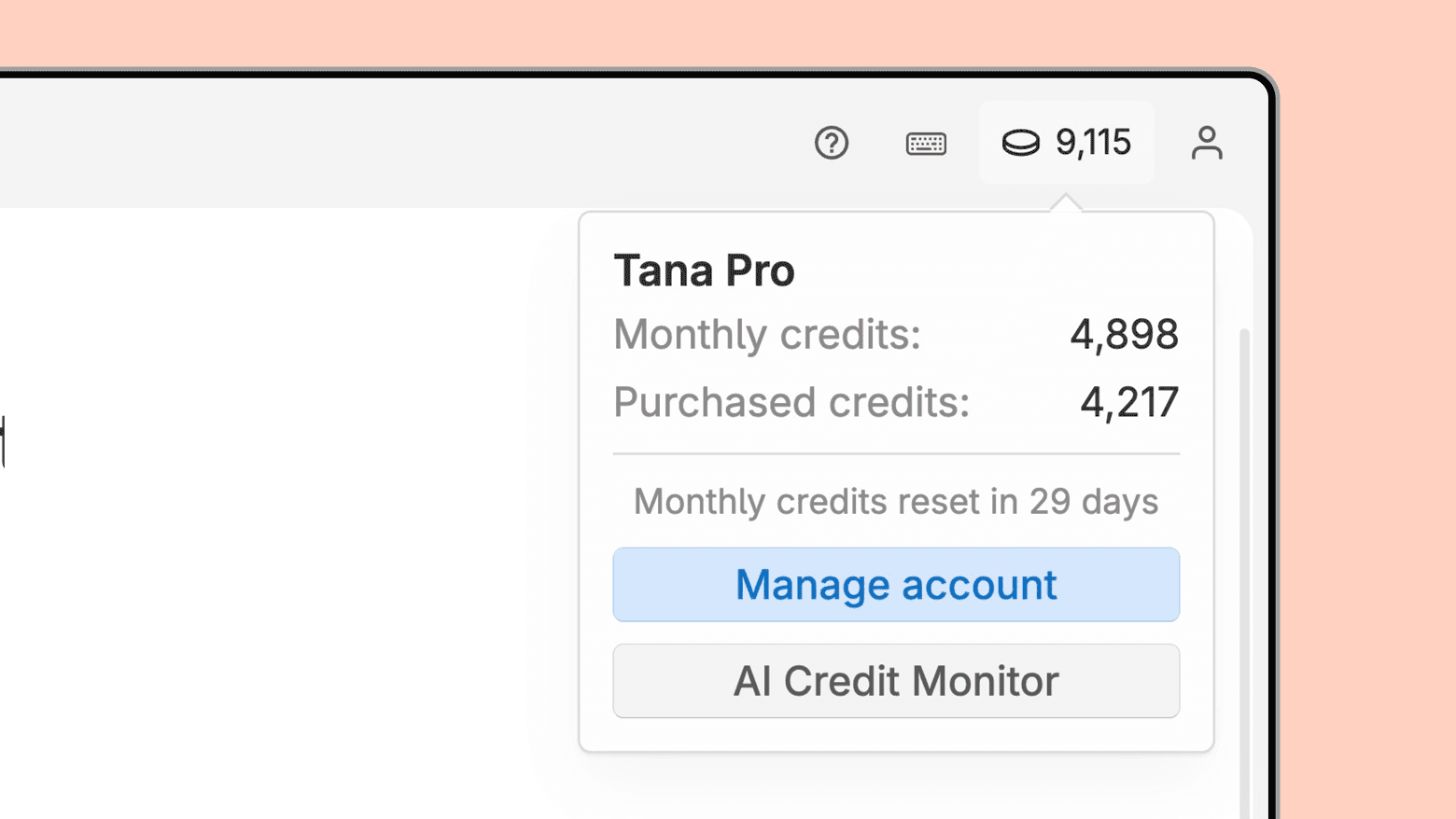
By default, an AI credit indicator is shown in the top menu of Tana Outliner. This lets you see a glance how many credits you have remaining, and by opening it you have quick access to the AI credit monitor log for all AI activities, as well as Manage account to buy additional credits.
If you don't want to see the AI credit indicator in the top menu, right-click it and select "Hide". You can bring it back from Manage account or by doing Cmd+KCtrl+K > Show/hide credits in top bar
How to buy extra AI credits?
If you use up the monthly credit quota, you can buy extra top up credits. Go to the user icon in the top right and open Manage account, and you'll see a section for AI credits.
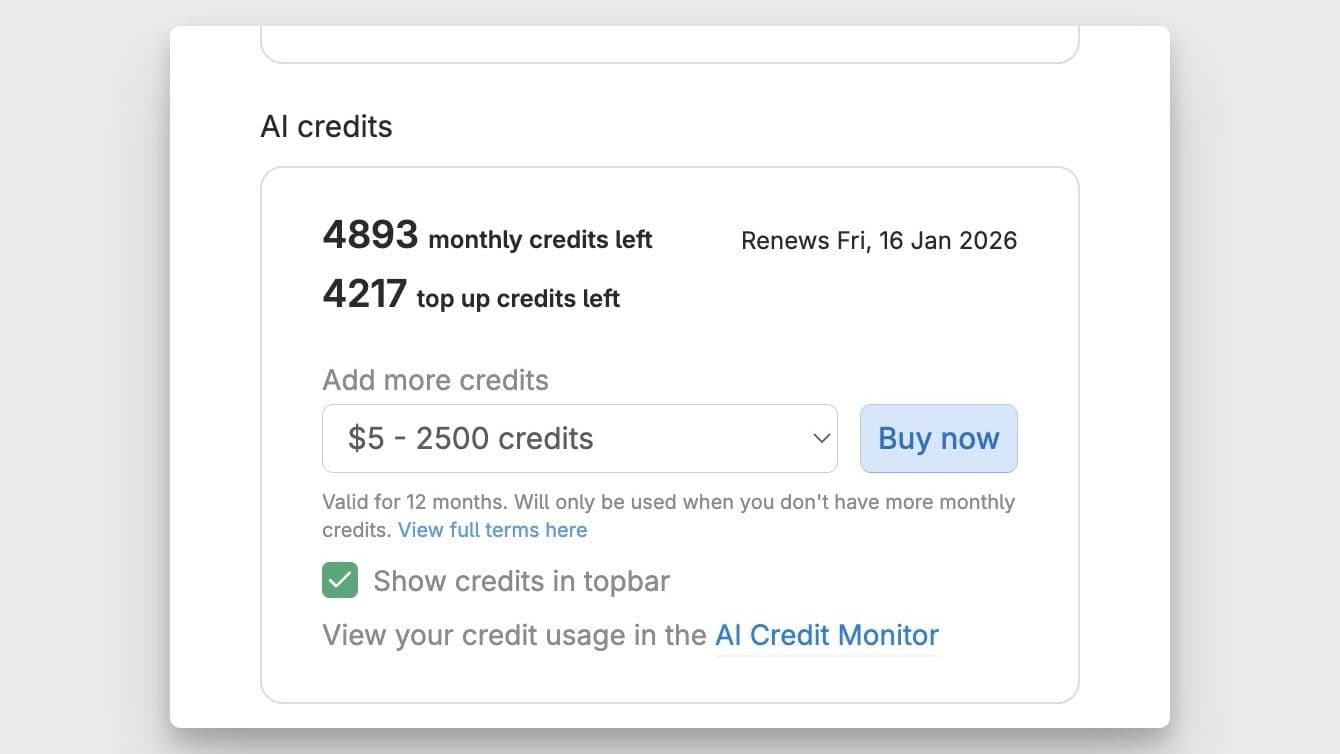
Top up credits are valid for 1 year from purchase, and do not follow the same cycle as the monthly quota. If you cancel your paid plan, top up credits will remain in your account.
It is not possible to buy extra credits inside the mobile apps, you must log into Tana Outliner on desktop/web browser.